


Shazam: Find Music & Concerts
ใช้ LDPlayer เล่น Shazam: Find Music & Concerts บน PC
Shazam: Find Music & Concerts เป็นแอปพลิเคชั่น เพลงและเสียง ที่พัฒนาโดย Apple Inc. ที่สามารถทำงานบนอุปกรณ์มือถือ ใช้โปรแกรมจำลอง Android-LDPlayer ที่ดีที่สุด คุณสามารถดาวน์โหลดและเล่น Shazam: Find Music & Concerts บนคอมพิวเตอร์ของคุณได้
การใช้ Shazam: Find Music & Concerts บนคอมพิวเตอร์ คุณสามารถเรียกดูได้อย่างชัดเจนบนหน้าจอขนาดใหญ่ และการควบคุมแอปพลิเคชันด้วยเมาส์และคีย์บอร์ดนั้นเร็วกว่าการใช้แป้นพิมพ์หน้าจอสัมผัสมากและคุณจะไม่ต้องกังวลกับพลังของอุปกรณ์ของคุณเลย
ด้วยคุณสมบัติเปิดหลายรายการและการซิงค์ คุณสามารถเรียกใช้แอปพลิเคชันและบัญชีหลายรายการบนพีซีของคุณได้
ฟังก์ชันการถ่ายโอนไฟล์ทำให้การแบ่งปันรูปภาพ วิดีโอ และไฟล์เป็นเรื่องง่ายมาก
ดาวน์โหลด Shazam: Find Music & Concerts และเรียกใช้บนพีซีของคุณ เพลิดเพลินไปกับหน้าจอขนาดใหญ่และคุณภาพความคมชัดสูงของเวอร์ชันพีซี!
Shazam สามารถระบุเพลงที่เล่นรอบตัวคุณหรือในแอพอื่นๆ ได้ แม้ว่าจะใส่หูฟังอยู่ก็ตาม ค้นพบศิลปิน เนื้อเพลง และคอนเสิร์ตที่กำลังจะมาถึง ทั้งหมดนี้ฟรี ด้วยการติดตั้งมากกว่า 2 พันล้านครั้งและผู้ใช้ 300 ล้านคนทั่วโลก!“Shazam เป็นแอปที่ให้ความรู้สึกราวกับมีมนต์ขลัง” - Techradar.com (http://techradar.com/)
“Shazam คือของขวัญ... ผู้เปลี่ยนเกม” - Pharrell Williams สัมภาษณ์ GQ
“ฉันไม่รู้ว่าเรามีชีวิตรอดก่อน Shazam ได้อย่างไร” - Marshmello
ทำไมคุณถึงรักมัน
* ระบุชื่อเพลงได้ทันที
* ประวัติเพลงของคุณ บันทึกและจัดเก็บไว้ในที่เดียว
* เปิดเพลงใดก็ได้โดยตรงใน Apple Music, Spotify, YouTube Music และ Deezer
* เรียกดูคอนเสิร์ตตามความนิยมหรือค้นหาตามศิลปิน สถานที่ และวันที่
* ติดตามพร้อมกับเนื้อเพลงที่ซิงค์กับเวลา
* ดูมิวสิควิดีโอจาก Apple Music หรือ YouTube
* รับ Shazam สำหรับ Wear OS
SHAZAM ทุกที่ทุกเวลา
* ใช้แถบการแจ้งเตือนของคุณเพื่อระบุเพลงในแอปใดๆ ไม่ว่าจะเป็น Instagram, YouTube, TikTok...
* ระบุเพลงจากหน้าจอโฮมของคุณอย่างรวดเร็วโดยใช้วิดเจ็ต Shazam
* ไม่มีการเชื่อมต่อ? ไม่มีปัญหา! Shazam ทำงานแบบออฟไลน์
* เปิด Auto Shazam เพื่อค้นหามากกว่าหนึ่งเพลง แม้ว่าคุณจะออกจากแอพแล้วก็ตาม
อะไรอีก?
* ค้นหาสิ่งที่ได้รับความนิยมในประเทศหรือเมืองของคุณด้วยแผนภูมิ Shazam
* รับเพลงและเพลย์ลิสต์ที่แนะนำเพื่อค้นพบเพลงใหม่
* ฟังและเพิ่มเพลงลงในเพลย์ลิสต์ Apple Music
* แชร์เพลงกับเพื่อน ๆ ผ่าน Snapchat, Facebook, WhatsApp, Instagram, X (ทวิตเตอร์อย่างเป็นทางการ) และอีกมากมาย
* เปิดใช้งานธีม Dark บน Shazam
* ดูความนิยมของเพลงโดยตรวจสอบจำนวน Shazam บนแอป
* สำรวจเพลงที่คล้ายกับเพลงที่คุณค้นพบ
ความพร้อมใช้งานและคุณสมบัติอาจแตกต่างกันไปในแต่ละประเทศ
สำหรับข้อมูลเพิ่มเติมเกี่ยวกับหลักปฏิบัติด้านความเป็นส่วนตัวของ Shazam โปรดอ่านนโยบายความเป็นส่วนตัวที่: https://www.apple.com/legal/privacy/
ภาพแคปหน้าจอและคลิปของ Shazam: Find Music & Concerts เวอร์ชั่น PC

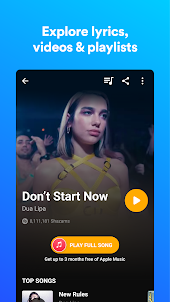

ทำไมต้องใช้ LDPlayer เล่น Shazam: Find Music & Concerts บน PC
วิธีดาวน์โหลด Shazam: Find Music & Concerts บนคอมพิวเตอร์
ดาวน์โหลดและติดตั้ง LDPlayer บนคอมพิวเตอร์ของคุณ
ค้นหา Play Store ในแอประบบของ LDPlayer และเปิดใช้งาน แล้วลงชื่อเข้าใช้บัญชี Google ของคุณ
ป้อน "Shazam: Find Music & Concerts" ลงในแถบค้นหาแล้วค้นหา
เลือก Shazam: Find Music & Concerts จากผลการค้นหาและติดตั้ง
เมื่อดาวน์โหลดและติดตั้งเสร็จ กลับไปที่หน้าหลักของ LDPlayer
คลิกไอคอนเกมบนหน้าหลักของ LDPlayer เริ่มเพลิดเพลินกับเกมที่น่าตื่นเต้น
หากคุณดาวน์โหลดไฟล์ APK จากแหล่งอื่นแล้ว เพียงเปิด LDPlayer แล้วลากไฟล์ APK ลงในโปรแกรมจำลองโดยตรง
หากคุณดาวน์โหลดไฟล์ XAPK จากแหล่งอื่นแล้ว โปรดดู บทช่วยสอนสำหรับคำแนะนำในการติดตั้ง
หากคุณได้รับทั้งไฟล์ APK และข้อมูล OBB จากแหล่งอื่น โปรดดูบทช่วยสอนสำหรับคำแนะนำในการติดตั้ง
ดีมากเลยเวลาที่อยากจะได้ชื่อเพลงก็เปิดเช็คแป็บเดียวรู้ชื่อเพลงเลย
เมื่อก่อนดูซีรี่ส์จีน กดหาชื่อเพลงได้ตลอด หลังๆมานี้ กดแล้วเป็นเพลงต่างประเทศบ้าง เป็นเพลงอินเดียบ้าง งงเลย
ใช้งานได้ดีมากครับ นึกชื่อเพลงไม่ออกใช้โลด แซ่บอีหลีเด้อ