
HONOR Health
ผู้ช่วยที่ชาญฉลาดและเอาใจใส่ด้านกีฬาและสุขภาพ
นักพัฒนาอย่างเป็นทางการของ HONOR Health คือ Honor Device Co., Ltd. LDPlayer ให้บริการดาวน์โหลด APK เท่านั้น

ภาพรวม

FAQ
เรียกใช้ HONOR Health บน PC ด้วย LDPlayer
HONOR Health เป็นแอปพลิเคชั่น สุขภาพและการออกกำลังกาย ที่พัฒนาโดย Honor Device Co., Ltd. ที่สามารถทำงานบนอุปกรณ์มือถือ ใช้โปรแกรมจำลอง Android-LDPlayer ที่ดีที่สุด คุณสามารถดาวน์โหลดและเล่น HONOR Health บนคอมพิวเตอร์ของคุณได้
การใช้ HONOR Health บนคอมพิวเตอร์ คุณสามารถเรียกดูได้อย่างชัดเจนบนหน้าจอขนาดใหญ่ และการควบคุมแอปพลิเคชันด้วยเมาส์และคีย์บอร์ดนั้นเร็วกว่าการใช้แป้นพิมพ์หน้าจอสัมผัสมากและคุณจะไม่ต้องกังวลกับพลังของอุปกรณ์ของคุณเลย
ด้วยคุณสมบัติเปิดหลายรายการและการซิงค์ คุณสามารถเรียกใช้แอปพลิเคชันและบัญชีหลายรายการบนพีซีของคุณได้
ฟังก์ชันการถ่ายโอนไฟล์ทำให้การแบ่งปันรูปภาพ วิดีโอ และไฟล์เป็นเรื่องง่ายมาก
ดาวน์โหลด HONOR Health และเรียกใช้บนพีซีของคุณ เพลิดเพลินไปกับหน้าจอขนาดใหญ่และคุณภาพความคมชัดสูงของเวอร์ชันพีซี!
แอป Honor Health เป็นแพลตฟอร์มซอฟต์แวร์ที่บันทึก วิเคราะห์ข้อมูลการเคลื่อนไหวและสุขภาพ เชื่อมต่อและจัดการอุปกรณ์ และมอบแพลตฟอร์มซอฟต์แวร์บริการการออกกำลังกายสำหรับผู้ใช้อุปกรณ์ที่รองรับ: Honor watch GS3/ Honor Bracelet 7/ Honor Watch 4
[ ติดตามการออกกำลังกายของคุณ]
จัดทำแผนภูมิหลักสูตรของคุณ ตรวจสอบการติดตามความคืบหน้า และช่วยให้คุณบรรลุเป้าหมาย ประเภทของการออกกำลังกายเป็นหลัก ได้แก่ เดิน วิ่ง ปั่นจักรยาน ติดตามได้ผ่านมือถือ
[ ติดตามข้อมูลด้านสุขภาพ]
ตรวจสอบอัตราการเต้นของหัวใจ ความเครียด การนอนหลับ น้ำหนัก และรายละเอียดรอบเดือนเพื่อติดตามสุขภาพของคุณได้อย่างง่ายดาย
ขออนุญาตจากผู้ใช้เพื่อดูสมุดที่อยู่ของโทรศัพท์ ประวัติการโทร รับ SMS ดู SMS ส่ง SMS ฟังสาย และฟังสถานะพลังงาน สิ่งนี้ช่วยให้คุณติดตามข่าวสารล่าสุดเกี่ยวกับโทรศัพท์ของคุณและตรวจสอบประวัติการโทร โทรออก ส่งและอ่าน SMS ที่โต๊ะโดยไม่ต้องตรวจสอบโทรศัพท์ของคุณบ่อยๆ
[ต้องได้รับอนุญาตต่อไปนี้เพื่อใช้บริการ]
- ตำแหน่ง: ใช้เพื่อบันทึกการเคลื่อนไหวและเพื่อรองรับอุปกรณ์ที่สวมใส่ได้เพื่อรับข้อมูลสภาพอากาศ เพื่อให้มั่นใจถึงความต่อเนื่องและความแม่นยำของเส้นทางวิ่ง เดิน และปั่นจักรยาน เราจะรวบรวมข้อมูลตำแหน่งของคุณ แม้ว่าขั้นตอนของแอปจะทำงานในเบื้องหลังก็ตาม
- การอนุญาตทางโทรศัพท์: ใช้เพื่อรับสายหรือโทรออกจากอุปกรณ์สวมใส่ที่ตรงกัน
- การอนุญาต SMS: ใช้เพื่อส่งและรับข้อความ SMS จากอุปกรณ์สวมใส่ที่ตรงกัน
- สิทธิ์บันทึกการโทร: ใช้สำหรับการจับคู่อุปกรณ์สวมใส่เพื่อดูบันทึกการโทร
- สิทธิ์ของแอปที่ติดตั้ง: เพื่อดูแอปที่ติดตั้งซึ่งสามารถส่งการแจ้งเตือนได้หลังจากเปิดสิทธิ์การแจ้งเตือน
- การอนุญาตกล้อง: ใช้เพื่อสแกนรหัสเพื่อเชื่อมต่ออุปกรณ์ เพิ่มเพื่อนและครอบครัว เปิด eSIM เข้าถึงอัลบั้มรูปภาพ ฯลฯ
- สิทธิ์ในการจัดเก็บข้อมูล: ใช้เพื่อสแกนโค้ดเพื่อเชื่อมต่ออุปกรณ์ เพิ่มเพื่อนและครอบครัว เปิดการ์ด eSIM เข้าถึงอัลบั้มรูป ฯลฯ
- การอนุญาตผู้ติดต่อ: ใช้เพื่อเลือกผู้ติดต่อเมื่อตั้งค่าผู้ติดต่อทั่วไปบนอุปกรณ์ที่สวมใส่ได้
- การอนุญาตอุปกรณ์ใกล้เคียง: ใช้ Release หลังจาก Android TER M7 เพื่อเชื่อมต่ออุปกรณ์สวมใส่หรือออกกำลังกาย12
- สิทธิ์ในการออกกำลังกาย: ใช้เพื่อรับข้อมูลการเคลื่อนไหวที่บันทึกโดยโทรศัพท์ของคุณ เพื่อให้คุณยังสามารถนับข้อมูลการเคลื่อนไหวของคุณเมื่อคุณใช้อุปกรณ์สวมใส่ได้
- การอนุญาตปฏิทิน: เพื่อบันทึกและแสดงโปรแกรมการออกกำลังกายของคุณ YOYO จะแนะนำการสอบถามกำหนดการเมื่อคุณออกจากการ์ด ฯลฯ
- สิทธิ์ในการแจ้ง: ใช้เพื่อส่งประกาศ เช่น อุปกรณ์ กีฬา ระบบ ฯลฯ ไปยังประกาศจากแอป
- ไมโครโฟน: ใช้เพื่อบันทึกและแชร์วิดีโอวิถีการเคลื่อนไหว
[ ข้อจำกัดความรับผิดชอบ]
คุณสมบัติเหล่านี้รองรับโดยอุปกรณ์เซ็นเซอร์เฉพาะ ซึ่งไม่เหมาะสำหรับการใช้งานทางการแพทย์ และใช้ได้เฉพาะกับผู้ใช้ฟิตเนสทั่วไปเท่านั้น โปรดดูคำอธิบายฮาร์ดแวร์สำหรับรายละเอียด
1. เพิ่มประสิทธิภาพความเสถียรของแอปพลิเคชันและปรับปรุงประสบการณ์ผู้ใช้
ภาพแคปหน้าจอและคลิปของ HONOR Health เวอร์ชั่น PC

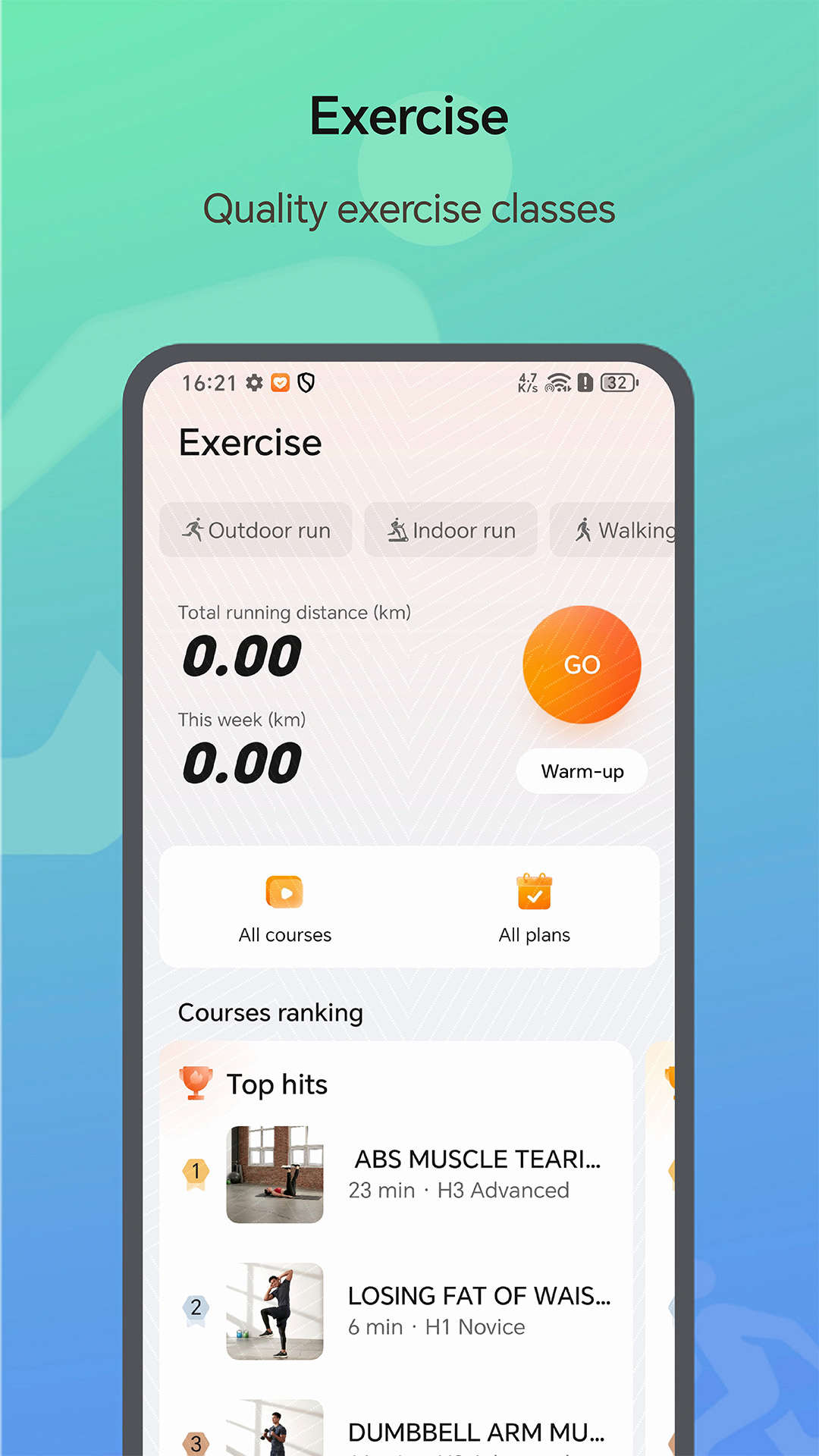

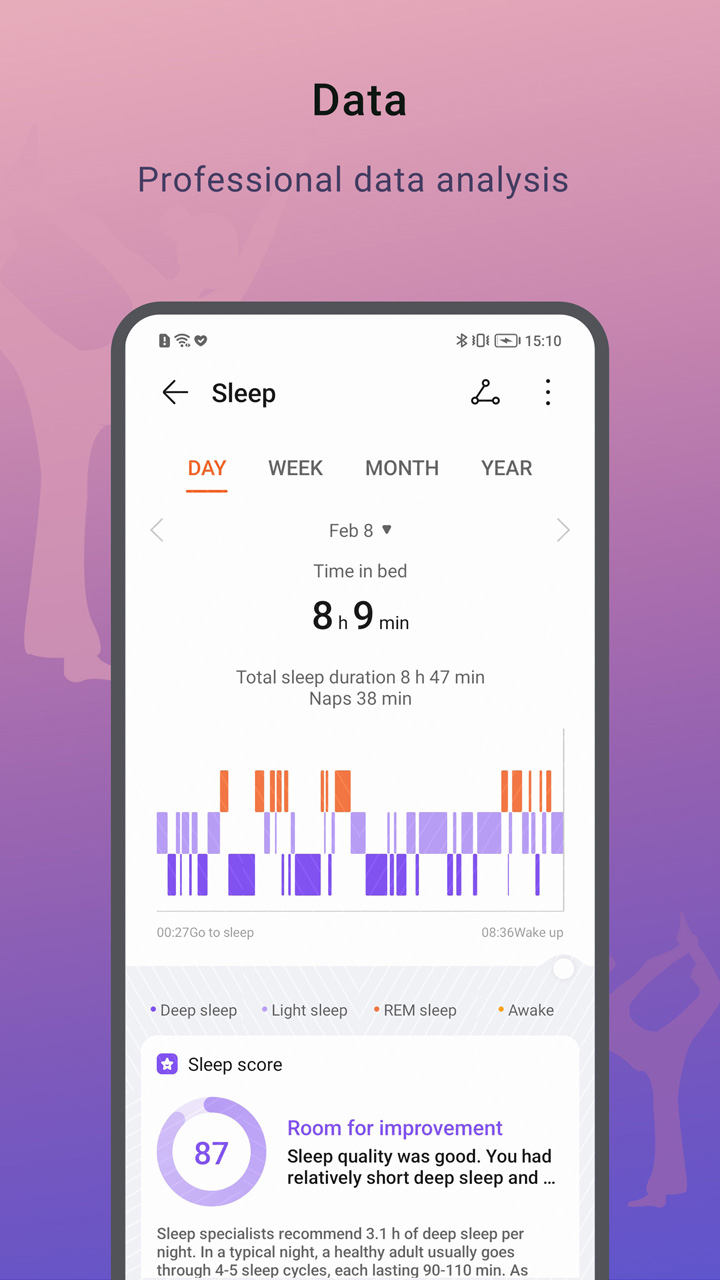
วิธีดาวน์โหลดและเรียกใช้ HONOR Health บน PC
 1
1ดาวน์โหลดและติดตั้ง LDPlayer บนคอมพิวเตอร์ของคุณ
 2
2ค้นหา Play Store ในแอประบบของ LDPlayer และเปิดใช้งาน แล้วลงชื่อเข้าใช้บัญชี Google ของคุณ
 3
3ป้อน "HONOR Health" ลงในแถบค้นหาแล้วค้นหา
 4
4เลือก HONOR Health จากผลการค้นหาและติดตั้ง
 5
5เมื่อดาวน์โหลดและติดตั้งเสร็จ กลับไปที่หน้าหลักของ LDPlayer
 6
6คลิกไอคอนเกมบนหน้าหลักของ LDPlayer เริ่มเพลิดเพลินกับเกมที่น่าตื่นเต้น


