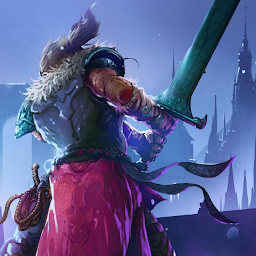


Elderand เป็นเกม แอคชั่น ที่พัฒนาโดย Plug In Digital LDPlayer เป็นแพลตฟอร์มที่ดีที่สุดในการเล่น Elderand บน Windows PC มันสามารถให้ฟังก์ชั่นอันทรงพลังเพื่อช่วยให้คุณได้รับประสบการณ์การเล่นเกมที่ดื่มด่ำในรูปแบบ Elderand
เมื่อคุณเล่น Elderand บนคอมพิวเตอร์ คุณสามารถปรับการตั้งค่าอัตราเฟรมและเพลิดเพลินกับประสบการณ์การเล่นเกมที่ราบรื่นและกราฟิกเกมสุดเจ๋ง
LDPlayer ยังมีการแมปแป้นพิมพ์ที่กำหนดค่าเพื่อเพิ่มความสะดวกของคุณในการควบคุมการทำงานของเกมทั้งหมด การเพิ่มประสิทธิภาพฟังก์ชั่นการจับคู่คีย์บอร์ดอย่างต่อเนื่องยังช่วยเพิ่มความไวของปุ่มและความแม่นยำในการปลดปล่อยทักษะอีกด้วย เพื่อปรับปรุงประสบการณ์การเล่นเกมของคุณ LDPlayer ยังกำหนดค่าปุ่มพิเศษให้กับคุณ เช่น ปุ่มถ่ายภาพ ปุ่มเมาส์ที่ซ่อนอยู่ การกดปุ่มอย่างต่อเนื่อง เป็นต้น
หากคุณต้องการเล่นเกมด้วยจอยการตรวจจับจอยที่เปิดใช้งานโดยอัตโนมัติจะช่วยให้คุณปรับแต่งการควบคุมและเคลื่อนย้ายฮีโร่ของคุณได้อย่างอิสระด้วยการคลิกง่ายๆ เพียงไม่กี่ครั้ง เริ่มดาวน์โหลดและเล่น Elderand บนคอมพิวเตอร์ของคุณทันที!
Become the hero of an epic quest in Elderand, a metroidvania that will test your will and skill. Heads will literally roll in this gruesome, retro-inspired action platformer, where only the strong will survive in brutal, skill-based combat against terrifying creatures.Through the darkness and madness, promised glory awaits.
Wield a variety of killing instruments and abilities to test your metal against towering, bone-chilling bosses. Explore a twisted Lovecraftian world shrouded in darkness and madness. RPG elements allow you to customize your battle experience to your liking, from your character’s appearance to skills, stats, and weapons.
Glory and riches await those who can spill the required blood and guts to collect it.
KEY FEATURES:
•Wield an arsenal of killing devices, including whips, swords, daggers, axes, bows, and more. From a magical staff that shoots bursts of energy to a giant sword, different weapons have different stats and capabilities, so find the ones that you enjoy battling beasts with the most!
•Satisfying Metroidvania-style exploration meets terrifying Lovecraftian creatures in this detailed hand-drawn pixel world with glorious gothic aesthetics and handcrafted level design.
•RPG elements let you customize your experience to best suit your play style, from your character’s appearance to their skills, stats, and weapons.
Collect loot from exploration and fallen enemies and then use it to upgrade your weapons via crafting.
•Travel to the many corners of this perilous land, such as an inviting village with merchants, a forest, a temple prison, floating islands, a cursed Cathedral, and the hellscape that is Elderand itself.
•More than 60 different enemy types and around a dozen bosses for your slaying pleasure.
•Collect lost letters and other correspondence from the poor souls who came before you to learn more about the darkness taking hold of this grim land.







